
Where am I? - ESP20.6.1 - Google Play
You'll be able to see results in few seconds.
Publisher Description
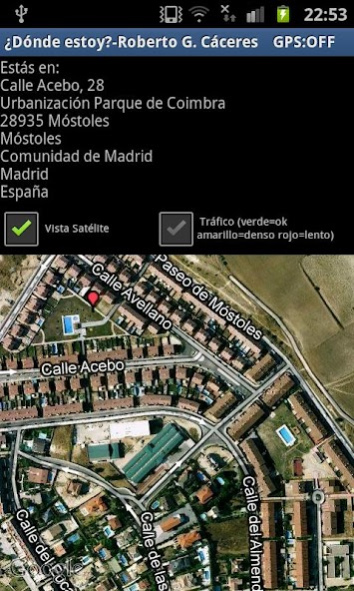
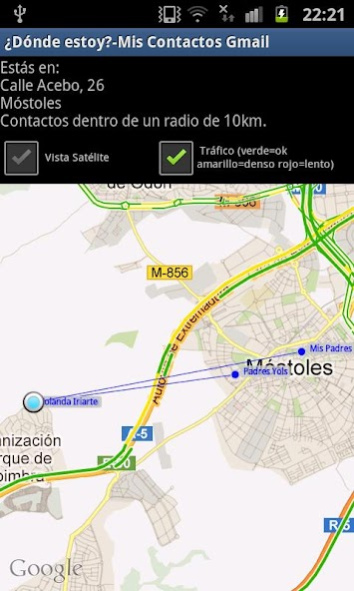


Spanish version ("¿Dónde estoy?"). You can find the english - international version ("Where am I?") at Market.
Powerful software that allows you determine your location, your Gmail contacts and your POIs (Point Of Interest)
created by you.
"Where am I?" will locate yo on a map indicating the postal address as well. This and more info (map link, weather
link, street view link, etc...) can be added into SMS and/or Email.
The main features of "Where am I?" are:
1. It indicates where you are usign GPS, cell network or WiFi, and the possibility to share your location.
2. It translates your location on a map with zoom, satellite view and traffic status.
3. This info and also current weahter, forecast weather, sunrise, sunset from location, info about the location (population, etc...), Street View (real photo of this place), detailed and simple map can be added into a SMS and/or Email and also saved to a TXT file on your SD Card.
4. It displays your Gmail contacts (those ones who are inside a 10km radius from your current location) on the map.
5. It displays your Gmail contacts on a list showing the distance between you and them. Also street view of their locations
6. Posibility to create your own POIs (from your location or out of any address) that are saved on a database. You can backup & restore this database whenever you wish. This POIs will be displayed on a map and if you tap of them the info regarding each POI will be shown.
7. These POIs can also be configured with proximity alert (you select the radious in meters and if the alert must expire and when). The alert warns you with a message and device vibration. Also you are warned when you exit the radius.
8. Options like "Refresh location..." and the posibility to a simple but useful navigation system can be also
highlighted.
9. And much more...
About Where am I? - ESP
The company that develops Where am I? - ESP is Roberto García Cáceres. The latest version released by its developer is 20.6.1.
To install Where am I? - ESP on your Android device, just click the green Continue To App button above to start the installation process. The app is listed on our website since 2020-06-09 and was downloaded 0 times. We have already checked if the download link is safe, however for your own protection we recommend that you scan the downloaded app with your antivirus. Your antivirus may detect the Where am I? - ESP as malware as malware if the download link to com.dondeestoy.rob is broken.
How to install Where am I? - ESP on your Android device:
- Click on the Continue To App button on our website. This will redirect you to Google Play.
- Once the Where am I? - ESP is shown in the Google Play listing of your Android device, you can start its download and installation. Tap on the Install button located below the search bar and to the right of the app icon.
- A pop-up window with the permissions required by Where am I? - ESP will be shown. Click on Accept to continue the process.
- Where am I? - ESP will be downloaded onto your device, displaying a progress. Once the download completes, the installation will start and you'll get a notification after the installation is finished.
Program Details
System requirements
Download information
Pricing
Version History
version 20.6.1
posted on 2020-06-09
Several fixes and adapted to Android X.
version 15.10
posted on 2018-12-09
Minor fixes and SMS features removed.
version 15.10
posted on 2015-09-21
15.10 - "Sharing" feature added and possibility to create POIs out of addresses,14.12 - "Push" notifications,14.11 - Avoid crash when the device has location issues,13.12.2 - No crash for the feature "Contactos Gmail en mapa",13.12.1 - Improvements regarding location signal reception,13.12 - Solved issue with SMS feature on devices without telephony sevice,13.11 - Minor improvements,Year 2012:,Minor changes.,Traffic function added so that you can check traffic status in main roads.
version 13.2
posted on 2013-02-10
Several fixes and updates
Disclaimer
Official Google Play Link
We do not host Where am I? - ESP on our servers. We did not scan it for viruses, adware, spyware or other type of malware. This app is hosted by Google and passed their terms and conditions to be listed there. We recommend caution when installing it.
The Google Play link for Where am I? - ESP is provided to you by apps112.com without any warranties, representations or guarantees of any kind, so access it at your own risk.
If you have questions regarding this particular app contact the publisher directly. For questions about the functionalities of apps112.com contact us.
